








In general
The idea was born 'cause I travel a lot and my parents usually ask me to text them when I reach the place; I always forget. So I told to myself, "Let's make an app that does it automatically". Of course there are many apps like that, for sure better than mine, but I used this as a pretext to start developing in Android.
More specifically
There are 3 options to send a precompiled text/mail automatically
Date and Time
This options allows the user to specify a date and a time to trigger the send of the sms or the send of the email
Gps Location
In this case the same thing happens when we reach a location previously set
Date and Gps
The last situation is just for optimization purposes. Consider you know you that you have to go to a specific location in 2 weeks and that you have already set the alarm and the corresponding message that you want to send. The app will start tracking your position from the moment that you set the alarm until you actually arrive to that place. That's really resources and battery consuming; it's kind of a waste 'cause you already know you won't need to be tracked for at least 2 weeks. So this option allow you to specify a date to start the tracking saving resources and battery
Further updates
Better interface
As you can see I didn't focus a lot the user interface 'cause that wasn't my main goal, given that I did it just as traning and not with the idea of putting it on the store
Help more the user
There are many thinks that you have to consider using this kind of app. For example if you plan to go outside of your country and you don't set up the right prefix, the app won't be able to send the text. That's why when you set up a location there should be some kind of control to check if the number to you set has the right prefix or not. There are other minor thinks that should be considered.
Slider
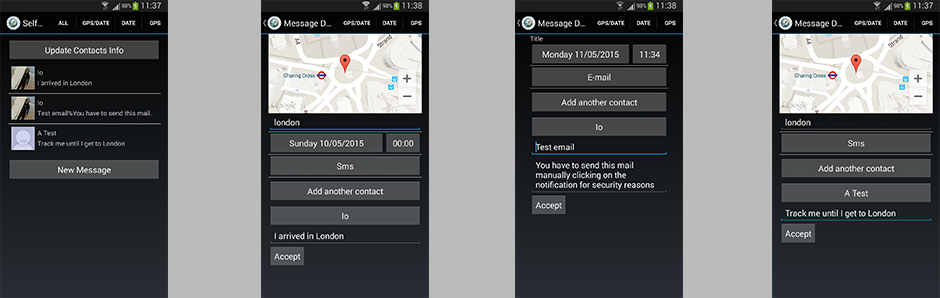
From left to right it's presented the interface of the app
Slide 1
First image: this is the home listing all the alarm that you have already set up, the possibility of accessing to the details of a single alarm clicking on it, the filter on the top right corner to show just one kind of alarm, the button that allows to check for any changes to the numbers or email adresses provided at the time the alarm was set and the possibility of setting a new alarm. It also allows you to edit or delete an alarm just by clicking and holding on it
Second image: it's the interface of the Date and Gps option; you can even add multiple numbers or email addresses to send to
Third image: the interface of the Date and Time option
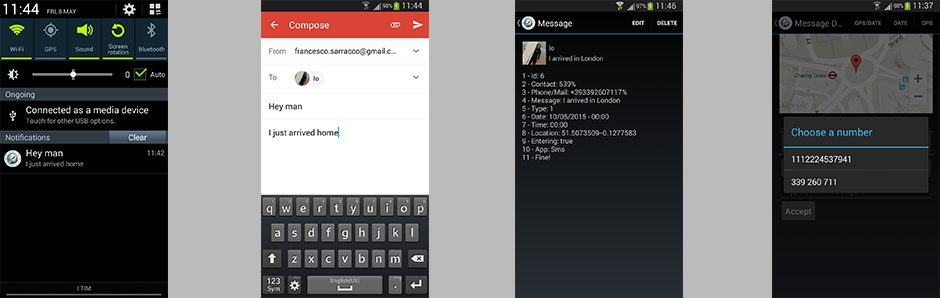
Slide 2
First image: it shows the notification that you get. In this example it's the notification of the email that allows you to full fill the email fields with what you set by clicking on it. Given that Android doesn't allow to send an email automatically unless you store the password on the device and that it's not actually a really secure procedure I prefered to leave it like that. In the situation of a text you just get the notification that the text has been sent
Second image: after clicking on the notification about the email you get the full filled email inteface
Third image: it's the detailed information about an alarm (the formattation of few infos are just for storing purposes)
Forth image: it shows the possibility of chosing a number or email between multiple ones of a chosen contact
Links
It's possible to check out the code on GitHub here